
Following up on my Mastodon post about wanting to start doing week notes, inspired by Ankur and Abhinav, here’s the quick rundown of how I supplemented my existing Obsidian journal to facilitate the new endeavor.
I currently use obsidian-periodic-notes to manage my daily notes and have mostly left the weekly/monthly option untouched, until now.
To actually collect the necessary journal entries, I relied on Dataview which I’ve used previously to get good at Marvel Snap. I wanted to minimize the changes I needed to make in my day-to-day workflow so I started with the restriction that at most I would be willing to tack on #weekly at the end of a journal entry that was noteworthy.
Dataview was able to beautifully navigate this limitation and with a little bit of JavaScript I now have a template that I can plug into Periodic Notes and get a roundup of the whole week in one click. Here’s how it looks with just today’s entries highlighted:
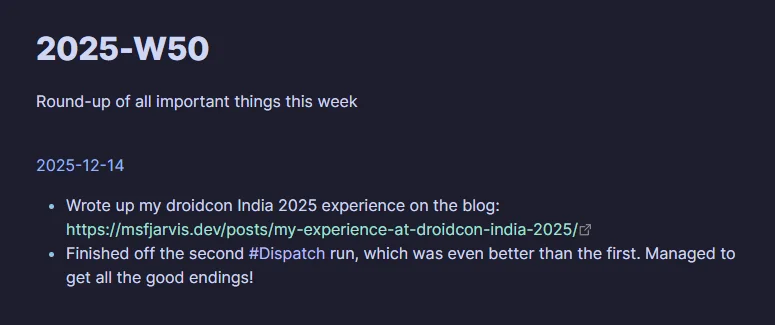
The relevant DataViewJS code is this:
(() => {
  const TAG = "#weekly";

  const m = dv.current().file.name.match(/^(\d{4})-W(\d{2})$/);
  if (!m) {
    dv.paragraph("Weekly note filename must be like `2025-W50.md`.");
    return;
  }

  function isoWeekStartISO(year, week) {
    // Compute ISO week start (Monday) in UTC, then return YYYY-MM-DD
    const simple = new Date(Date.UTC(year, 0, 1 + (week - 1) * 7));
    const dow = simple.getUTCDay(); // 0..6, Sun..Sat

    const start = new Date(simple);
    if (dow <= 4) start.setUTCDate(simple.getUTCDate() - dow + 1);
    else start.setUTCDate(simple.getUTCDate() + (8 - dow));

    // YYYY-MM-DD
    return start.toISOString().slice(0, 10);
  }

  const year = Number(m[1]);
  const week = Number(m[2]);

  const start = dv.date(isoWeekStartISO(year, week));
  const end = start.plus({ days: 7 });

  const pages = dv.pages('"Daily"')
    .where(p => p.file.day && p.file.day >= start && p.file.day < end)
    .sort(p => p.file.day, "asc");

  let any = false;

  for (const p of pages) {
    const bullets = (p.file.lists ?? []).filter(li => (li.text ?? "").includes(TAG));
    if (!bullets.length) continue;

    any = true;

    // [[YYYY-MM-DD]]
    dv.paragraph(p.file.link.toString());

    // - Line 1
    // - Line 2
    dv.list(
      bullets
        .map(li => li.text ?? "")
        .map(t => t.replace(TAG, "").replace(/\s+/g, " ").trim())
        .filter(Boolean)
    );

    dv.paragraph("");
  }

  if (!any) dv.paragraph(`No ${TAG} bullets found for ${m[1]}-W${m[2]}.`);
})();
The code is relatively simple: It finds the week number from the current file name, gathers the range of dates for that week, inspects each file for lines that contain #weekly, and then neatly lays them out grouped by date.